MLOps - On-Demand Feature Computation
TABLE OF CONTENTS
- 1.Introduction#introduction
- 2.What are On-Demand Features#what-are-on-demand-features
- 2.1.Example#example
- 3.Why Not Store Them#why-not-store-them
- 4.Model Training#model-training
- 5.Training-Serving Skew#training-serving-skew
- 5.1.How It Happens#how-it-happens
- 5.2.Sources of Drift#sources-of-drift
- 5.3.Why It's Hard to Catch#why-its-hard-to-catch
- 6.Implementation Approaches#implementation-approaches
- 6.1.Shared Library#shared-library
- 6.2.Feature Platform Native#feature-platform-native
- 7.Databricks On-Demand Features#databricks-on-demand-features
- 7.1.Python UDF#python-udf
- 7.2.FeatureLookup and FeatureFunction#featurelookup-and-featurefunction
- 7.3.FeatureSpec#featurespec
- 7.4.Building the Training Set#building-the-training-set
- 7.5.Model Serving#model-serving
- 7.6.Feature Serving#feature-serving
- 7.7.Putting It Together#putting-it-together
- 8.Conclusion#conclusion
- 9.Resources#resources
Introduction
Over the past period, I've been working on on-demand feature computation, and in this post I want to share some of the insights I've gathered along the way.
In one of my previous posts, Exploring and Understanding Feature Stores, we went through the idea of a feature store as a central place where features are computed, stored, and served for both training and inference. Most of that discussion revolved around precomputed features, values produced by batch or streaming pipelines, written to an offline table, and published to an online store for low-latency lookup.
However, not every feature fits into that model. Some of the most useful signals depend on information that simply doesn't exist until the moment a prediction is requested: where the user is right now, what time it is, what they just typed into the search bar, or what's currently in their shopping cart. There is nothing to precompute, because the input hasn't happened yet.
These are called on-demand features, and handling them properly is one of the places where MLOps setups tend to get messy. Quite often, they end up implemented as ad-hoc preprocessing code inside the inference service, with a separate implementation living in a training notebook somewhere, which is a common cause of training-serving skew.
In this blog post, I'll explore what on-demand features are, why they are not stored like regular features, how they are handled during model training, what goes wrong when training and serving compute them differently, and how Databricks solves this with a single feature definition shared across both paths.
What are On-Demand Features
On-demand features are features computed at inference time from request-time inputs, often combined with stored feature values, because they cannot be precomputed and stored ahead of time. Their values depend on information that only becomes available at the moment a prediction is requested.
Let's compare them with the traditional approach. Regular features are precomputed in batch or streaming pipelines, stored in an offline feature table, and published to an online store for low-latency lookup. At inference time, the serving layer looks them up by key and passes them to the model. The model itself only works with the feature values it receives. Fetching them is the responsibility of the code around it, whether that's a separate service or an inference wrapper deployed together with the model.
On-demand features, instead, are calculated at inference time by a function that combines:
- Request-time inputs - values sent together with the prediction request, e.g. the user's current location
- Stored feature values - values looked up from the feature store, e.g. the location of a restaurant
Why do we need them? Because many of the most predictive signals are contextual: the user's current location, the time of the request, the contents of a shopping cart, or the relationship between a live input and a stored entity attribute. Without on-demand computation, a model would have to ignore these signals entirely. A restaurant recommender that doesn't know how far the user is from each restaurant can only fall back on generic signals like popularity or ratings, and will happily recommend a highly rated place on the other side of the city. The model would be limited to what was known before the request arrived, while the information that often matters most, the context of the request itself, would be thrown away.
Example
Let's illustrate this with a typical case: a restaurant recommendation model that scores how relevant a restaurant is to a user based on how far away they are.
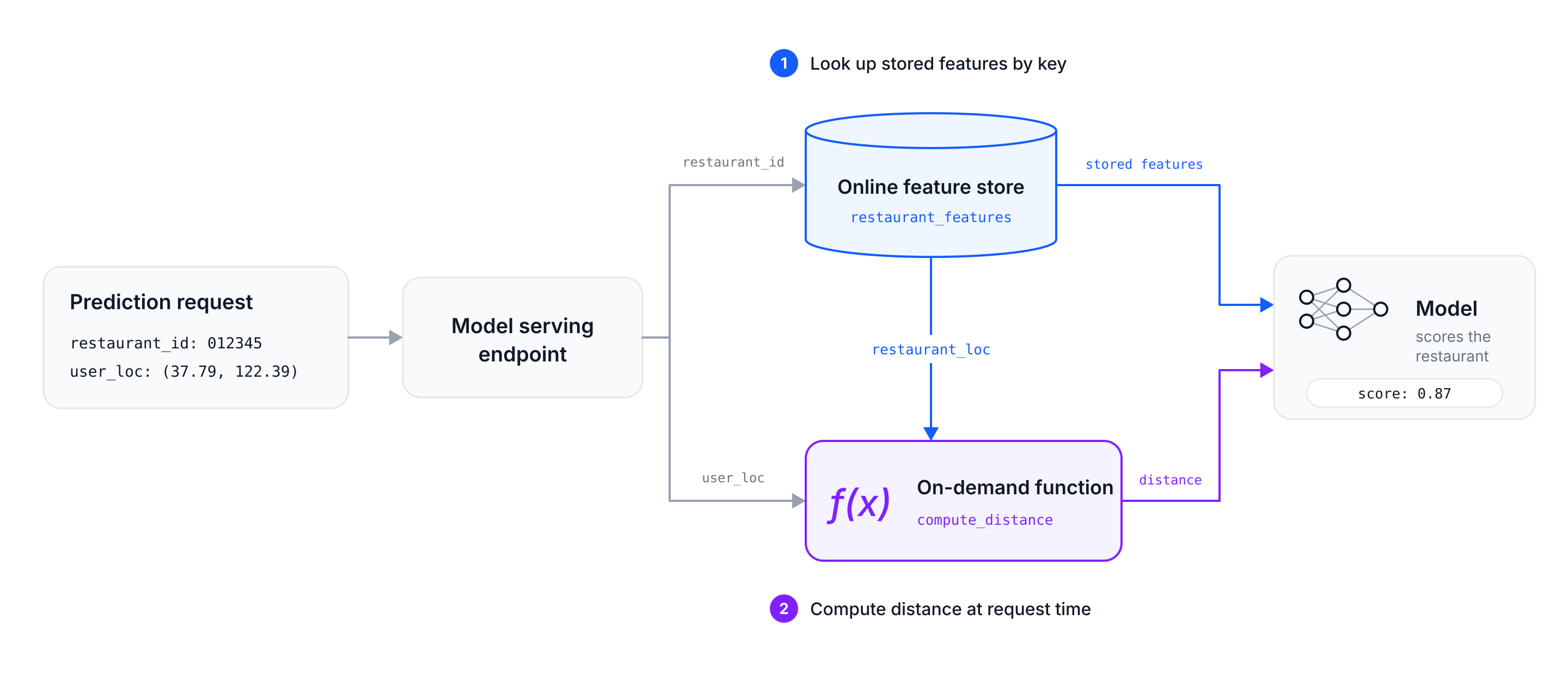
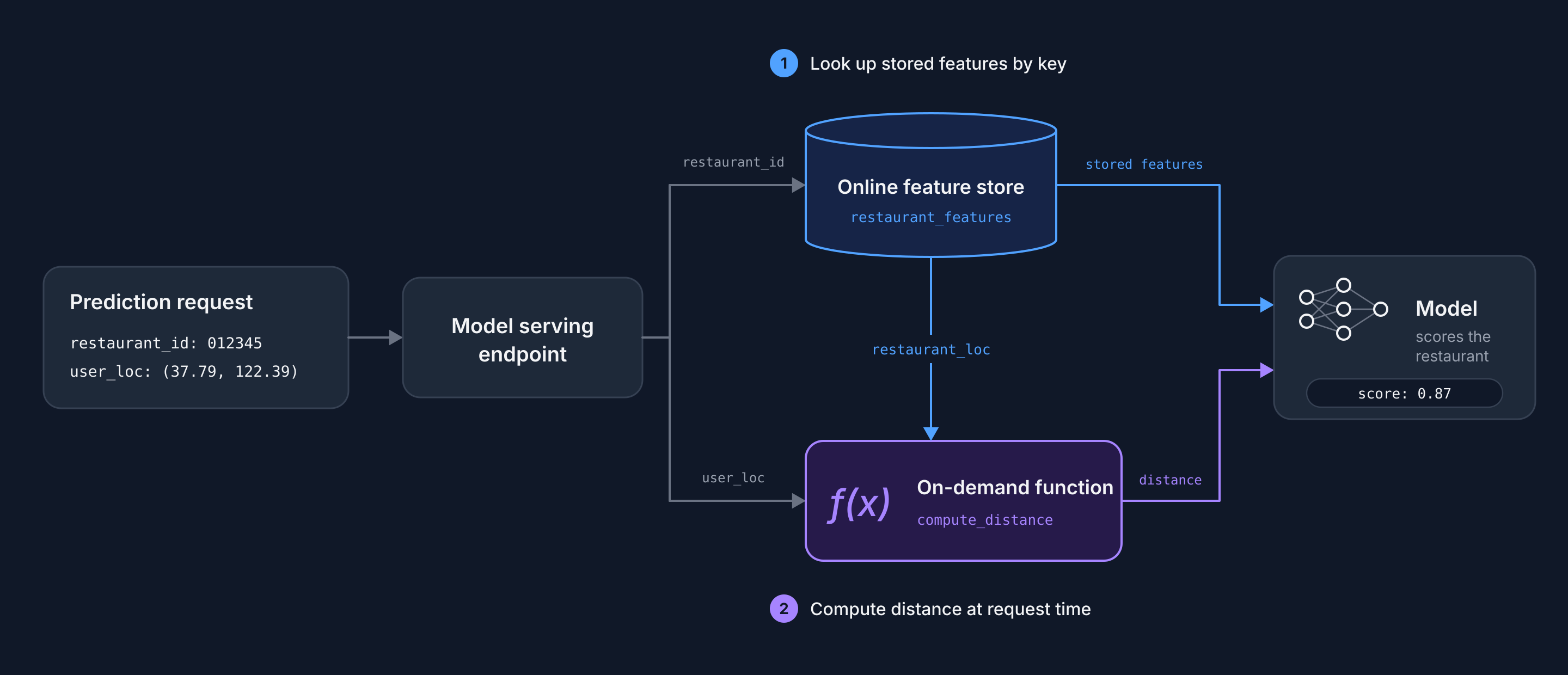
On-demand feature computation at serving time
A request arrives at the model serving endpoint with two inputs:
restaurant_id: 012345- the user's current location
user_loc: (37.79, 122.39)
The serving endpoint first looks up the restaurant's location from the online feature store. It then
passes both the stored restaurant coordinates and the live user coordinates into the
compute_distance function, which calculates the distance between them. That distance, together
with the other looked-up features, is fed into the model to produce a score.
The important part here is that distance is never stored anywhere. It exists only for the
duration of the request.
Why Not Store Them
A natural question is - why not just precompute these values and store them like any other feature? There are a few reasons why that doesn't work.
There is nothing stable to store. On-demand feature values depend on inputs that only exist at request time. The restaurant's location is stable and can live in a feature table, but the distance to a user who is standing somewhere right now is not.
The input space is effectively unbounded. On-demand features are functions of one or more request-time inputs, often combined with stored entity attributes. In our example, that's every possible user location paired with every restaurant. Precomputing them would mean materializing values for inputs that will mostly never be requested, at a cost that grows far faster than the value it provides.
Stored values would be stale immediately. Even if precomputation were feasible, any stored value would be outdated as soon as the request-time input changed, while an on-demand feature is meant to reflect the exact context of the current request.
So, on-demand features are not stored in the offline or the online store. What is stored is their definition, the function, and that's exactly what we need to govern and share.
Model Training
If on-demand features aren't stored, how does a model learn from them?
In general, they are handled during model training by recomputing them from historical data rather than reading them from a table. This puts a requirement on our data: each training example must record the request-time inputs that were present when the event occurred, such as the user's location, the timestamp, or the query context.
These inputs are then joined with the stored entity features as of that point in time, and the on-demand transformation is applied to produce the feature values the model learns from.
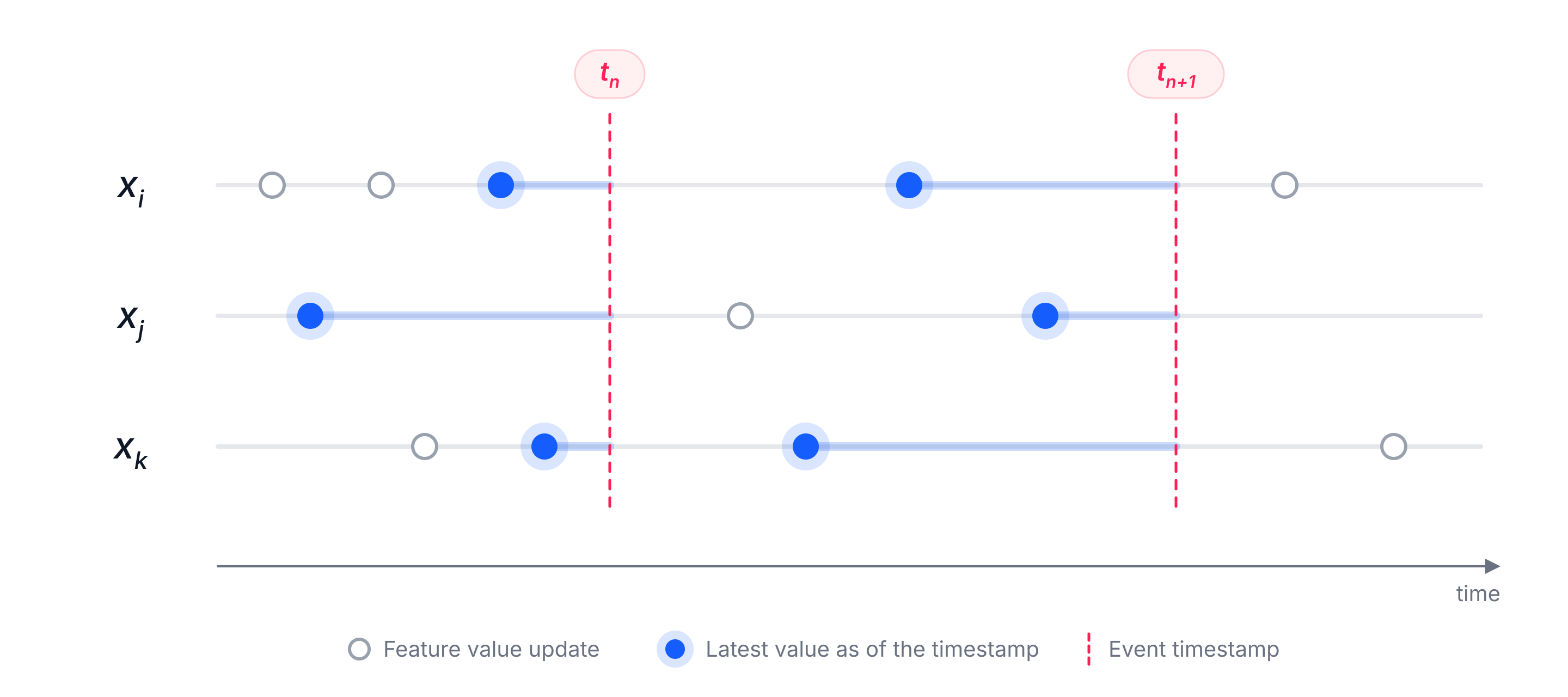
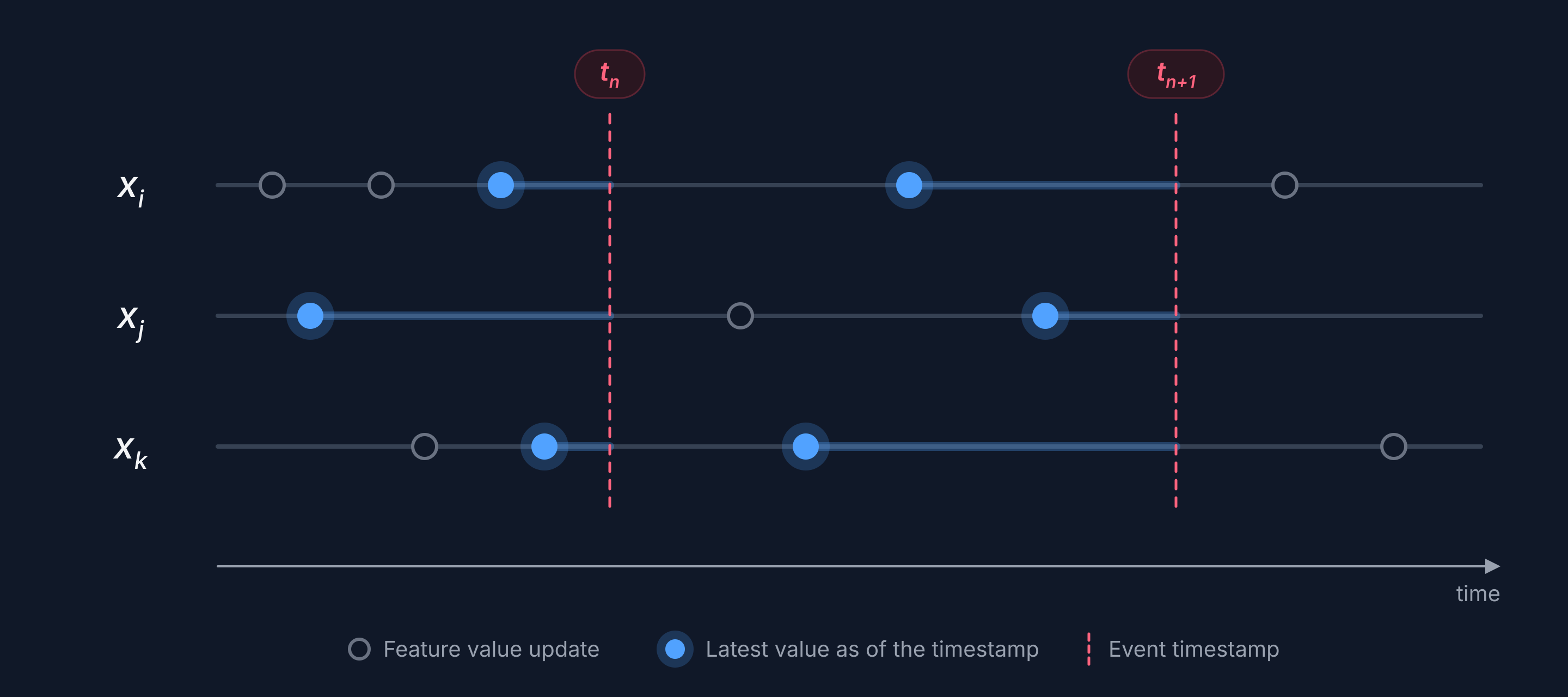
Point-in-time feature lookup
If request-time inputs are not logged at inference time, you won't be able to reconstruct the on-demand features later for training. Make sure your inference logging captures the raw request payload, not just the model inputs and outputs.
The key requirement is that the transformation used in training is exactly the same logic that runs at inference. This sounds obvious, but in practice it's where most on-demand feature setups break down.
Training-Serving Skew
Training-serving skew is a difference between how a model behaves during training and how it behaves in production, caused by the model receiving different feature values for the same underlying input. With precomputed features this is mostly avoided by design, since training and serving read the same values from the offline and online store. With on-demand features there is no stored value to share, only code, so the question becomes: is it the same code?
How It Happens
In many teams, on-demand features grow organically. A data scientist explores the data in a notebook and derives a feature, let's say the distance between the user and the restaurant, using whatever is convenient at the time:
# training notebook
import numpy as np

def haversine_np(lat1, lon1, lat2, lon2):
    lat1, lon1, lat2, lon2 = map(np.radians, [lat1, lon1, lat2, lon2])
    a = np.sin((lat2 - lat1) / 2) ** 2 + np.cos(lat1) * np.cos(lat2) * np.sin((lon2 - lon1) / 2) ** 2
    return 6371 * 2 * np.arcsin(np.sqrt(a))

df["distance"] = haversine_np(df.restaurant_lat, df.restaurant_lon, df.user_lat, df.user_lon)
The model is trained, evaluated, and handed over for deployment. Then, an engineer working on the inference server needs the same feature. The notebook isn't a package, it can't be imported, so the logic gets rewritten in the serving code:
# inference server
from geopy.distance import geodesic

def compute_distance(restaurant: dict, request: dict) -> float:
    return geodesic(
        (restaurant["lat"], restaurant["lon"]),
        (request["user_lat"], request["user_lon"]),
    ).miles
At first glance, both functions compute "the distance", and both implementations are correct on their own. In reality, there are two differences in just a few lines of code:
- Different algorithm - haversine assumes a spherical Earth, while geodesic uses an ellipsoid, so the values differ slightly
- Different units - kilometers in training, miles in serving
Neither of these is a bug that a code review would flag. They are small, reasonable choices made by two different people at two different times, and that's exactly why they are so easy to overlook. Yet their impact on the model can be significant: a change of units alone scales every distance by a factor of roughly 1.6, so a restaurant the model learned to treat as "5 away" now arrives as "3 away", and every decision boundary the model learned on this feature is shifted.
Nothing fails. The endpoint returns a score for every request, latency is fine, and all health
checks are green. The model just quietly makes worse predictions, because the distribution of the
distance feature it receives in production is not the one it learned from.
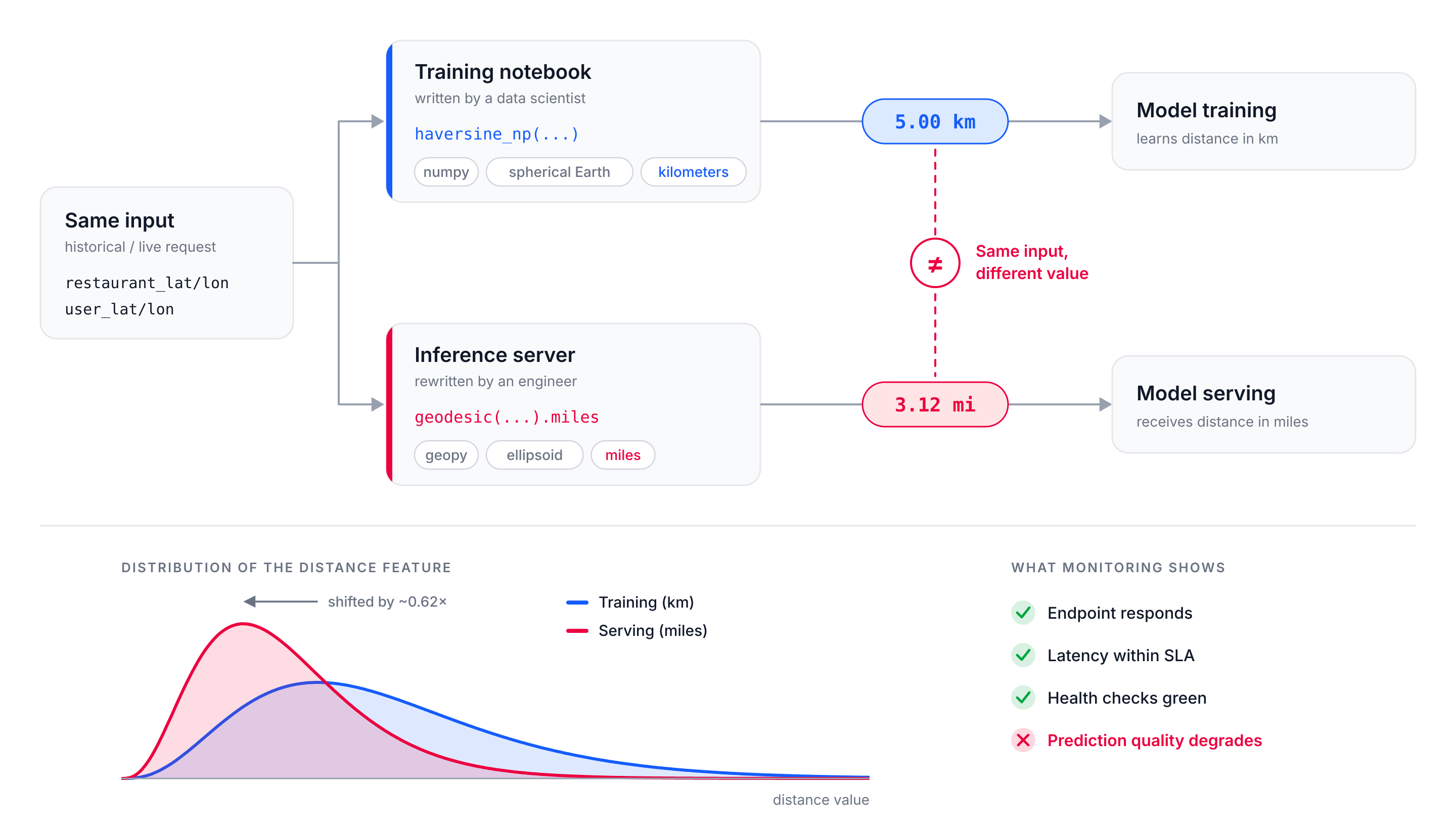
Training-serving skew caused by two implementations of the same feature
Sources of Drift
The example above is deliberately obvious. In practice, the differences are usually subtler and accumulate over time:
- Logic divergence - someone fixes a bug or tweaks the feature in the training notebook, but the inference server is never updated, or vice versa
- Library versions - the notebook runs on a cluster with one version of
numpy,pandasorgeopy, and the inference container pins another - Null and default handling - pandas propagates
NaN, while the serving code falls back to0or raises an exception that is caught and replaced with a default - Types and precision -
float32in one path,float64in the other, or integer division where floating point was expected - Time handling - timestamps interpreted in UTC during training and in local time during serving, which shifts features like "hour of the day" or "is weekend"
- Batch vs. row semantics - vectorized operations over a whole DataFrame in training versus single-record logic in serving, e.g. normalizing by a statistic computed over the batch
Why It's Hard to Catch
What makes this kind of drift dangerous is that it's silent. Unlike data drift, where the real world changes, here the world stays the same and only our code disagrees with itself. Offline evaluation looks great, because it uses the training implementation end-to-end. Online metrics degrade, but slowly and for reasons that are hard to attribute.
You can detect it by logging the feature values the model actually received at serving time and comparing their distribution against the training set, or by replaying logged requests through the training code and diffing the results. These are useful safety nets, but they only tell you that something went wrong after the fact.
The real fix is structural: there should be only one implementation. The feature definition should live in a single place, be versioned, and be referenced, not copied, by both the training pipeline and the serving path.
Implementation Approaches
There are a couple of common ways to get to a single implementation.
Shared Library
A pattern I've seen quite often is implementing on-demand features as compute functions in a shared Python library. The library is packaged as a dependency of the inference endpoint (e.g. a SageMaker endpoint) and invoked from the model inference wrapper right before the model is called. The functions only compute the on-demand features from the inputs they receive, and where those inputs come from is up to the caller. They can be request-time values, features fetched from an online store, or values provided by another service. Training pipelines install the same library and call the same functions.
This is a big step forward compared to scattered notebooks, but it still has a few drawbacks:
- Weak coupling between model and feature version - the model artifact doesn't know which version of the library it was trained with. Upgrading the library in the endpoint can silently change feature values, which brings us right back to skew.
- No governance or discoverability - the functions are just code in a package. There is no central place to see which on-demand features exist, who owns them, and which models use them.
- Duplicated glue code - every inference wrapper has to implement the same "gather inputs, compute, predict" sequence, and every training pipeline has to wire up the same joins.
- Dependency management - the library becomes a dependency of every endpoint, so its dependencies and their conflicts leak into every model image.
Feature Platform Native
The alternative is to treat on-demand features as first-class feature store objects. The function is registered once, governed like any other asset, and referenced by name in both training and serving. The serving layer, not the model wrapper, is responsible for orchestrating lookups and computations, and the model artifact records exactly which features and functions it depends on.
Let's see how Databricks implements this.
Databricks On-Demand Features
Databricks covers the whole on-demand feature setup with four building blocks:
- Python UDFs in Unity Catalog - the on-demand transformation itself, defined once
- FeatureLookup - which stored features to look up, from which table, and by which key
- FeatureFunction - which UDF to call, and how to bind its inputs to request-time values or looked-up features
- FeatureSpec - a named, governed set of
FeatureLookupandFeatureFunctiondefinitions, stored in Unity Catalog
The key idea is that the same feature definition is used for model training and for serving. There is no second implementation to write, so there is nothing that can drift.
For more information, please see Compute features on demand using Python user-defined functions.
Python UDF
First, we define the on-demand transformation as a Python UDF registered in Unity Catalog:
CREATE OR REPLACE FUNCTION main.ml.compute_distance(
  restaurant_lat DOUBLE,
  restaurant_lon DOUBLE,
  user_lat DOUBLE,
  user_lon DOUBLE
)
RETURNS DOUBLE
LANGUAGE PYTHON
COMMENT 'Haversine distance in kilometers between a restaurant and a user'
AS $$
import math

r = 6371.0
phi1, phi2 = math.radians(restaurant_lat), math.radians(user_lat)
d_phi = math.radians(user_lat - restaurant_lat)
d_lambda = math.radians(user_lon - restaurant_lon)

a = math.sin(d_phi / 2) ** 2 + math.cos(phi1) * math.cos(phi2) * math.sin(d_lambda / 2) ** 2
return 2 * r * math.asin(math.sqrt(a))
$$
Since the function is registered in Unity Catalog, it gets the same governance as any other asset: permissions, lineage, and discoverability. Anyone who needs the distance feature can find it and reuse it, instead of writing yet another haversine implementation.
FeatureLookup and FeatureFunction
Next, we describe the features the model needs. A FeatureLookup fetches the stored restaurant
coordinates, and a FeatureFunction computes the distance on demand:
from databricks.feature_engineering import (
    FeatureEngineeringClient,
    FeatureFunction,
    FeatureLookup,
)

fe = FeatureEngineeringClient()

features = [
    FeatureLookup(
        table_name="main.ml.restaurant_features",
        lookup_key="restaurant_id",
        feature_names=["restaurant_lat", "restaurant_lon"],
    ),
    FeatureFunction(
        udf_name="main.ml.compute_distance",
        output_name="distance",
        input_bindings={
            "restaurant_lat": "restaurant_lat",
            "restaurant_lon": "restaurant_lon",
            "user_lat": "user_lat",
            "user_lon": "user_lon",
        },
    ),
]
The input_bindings map each UDF parameter to a column, which can either come from a
FeatureLookup (restaurant_lat, restaurant_lon) or be provided with the request
(user_lat, user_lon).
FeatureSpec
Instead of passing this list around, we can register it in Unity Catalog as a FeatureSpec:
fe.create_feature_spec(
    name="main.ml.restaurant_distance_spec",
    features=features,
)
A FeatureSpec combines FeatureLookup and FeatureFunction definitions into a single logical
unit, stored and governed in Unity Catalog with full lineage tracking. More importantly, it can be
used both for model training and for feature serving. This means we create a single object
that describes our features, and reuse it everywhere we need them.
For more information, please see FeatureSpec.
Building the Training Set
To build the training set, we reference the FeatureSpec by name in create_training_set,
together with a DataFrame of historical events containing the lookup keys, the request-time
inputs, and the label:
training_set = fe.create_training_set(
    df=events_df,  # restaurant_id, user_lat, user_lon, label, ...
    feature_spec="main.ml.restaurant_distance_spec",
    label="label",
)

training_df = training_set.load_df()
The client performs the lookups, calls compute_distance for every row, and returns a DataFrame
ready for training.
Alternatively, you can pass the features list directly using the feature_lookups parameter.
This works the same way, but the feature definition then lives in your training code instead of
a governed, reusable object in Unity Catalog.
For more information, please see the official documentation page Train models with Feature Tables.
Model Serving
Once the model is trained, we log it with fe.log_model and pass the training_set:
import mlflow

fe.log_model(
    model=model,
    artifact_path="model",
    flavor=mlflow.sklearn,
    training_set=training_set,
    registered_model_name="main.ml.restaurant_recommender",
)
This packages the model together with its feature specification, which tables to look up and which
functions to call with which bindings. When the model is deployed to a Model Serving endpoint, and
the restaurant_features table is published to an online store, the client only has to send the
lookup key and the request-time inputs:
{
  "dataframe_records": [
    {"restaurant_id": "012345", "user_lat": 37.79, "user_lon": -122.39}
  ]
}
The endpoint looks up the restaurant coordinates, computes the distance using the very same
main.ml.compute_distance function used during training, and feeds everything to the model. There
is no inference wrapper code to write and nothing to keep in sync.
Feature Serving
Sometimes we don't want a model at the end of the pipeline, but just the features themselves - for example, when the model is hosted outside of Databricks, or when another application needs the computed values. For that, we serve the same FeatureSpec we used to build the training set through a Feature Serving endpoint:
from databricks.sdk import WorkspaceClient
from databricks.sdk.service.serving import EndpointCoreConfigInput, ServedEntityInput

w = WorkspaceClient()

w.serving_endpoints.create(
    name="restaurant-distance",
    config=EndpointCoreConfigInput(
        served_entities=[
            ServedEntityInput(
                entity_name="main.ml.restaurant_distance_spec",
                workload_size="Small",
                scale_to_zero_enabled=True,
            )
        ]
    ),
)
Querying the endpoint with the same payload as above returns the looked-up restaurant coordinates
and the computed distance, calculated by exactly the same definition used to build the training
set.
For more information, please see Feature Serving endpoints.
Putting It Together
Looking at the whole setup, one feature definition flows through every path:
- The UDF defines the transformation once, in Unity Catalog
- The FeatureLookup and FeatureFunction objects describe how to assemble the features
- The FeatureSpec registers them as a single, governed object in Unity Catalog
- Training uses the FeatureSpec through
create_training_set - Model Serving uses the feature metadata packaged by
fe.log_model - Feature Serving serves the same FeatureSpec through a Feature Serving endpoint
Compared to the scattered notebook and inference server code from the skew example, there is no place where a second implementation could appear.
That being said, there are a few things to keep in mind:
- Latency - the UDF runs on every request, so it should be lightweight. Heavy computations, external calls, or large dependencies don't belong in an on-demand function.
- Limited environment - Python UDFs have restrictions on available libraries and runtime, so not every existing compute function can be ported as-is.
- Versioning - replacing a function with
CREATE OR REPLACEaffects every model and feature spec referencing it. Breaking changes should be introduced as a new function, e.g.compute_distance_v2, rather than by modifying an existing one.
Conclusion
On-demand features let models use contextual signals that only exist at request time, signals that are often among the most predictive ones. The challenge isn't computing them, that's usually a few lines of code, but making sure the exact same logic runs in training and in serving.
To recap:
- On-demand features are computed at inference time from request-time inputs, often combined with stored feature values.
- They are not stored in the offline or online store, because their input space is unbounded and any stored value would be stale immediately.
- For training, they are recomputed from historical request-time inputs joined with point-in-time stored features, so make sure you log those inputs.
- Separate implementations in training notebooks and the inference server inevitably drift apart, causing silent training-serving skew. The fix is a single, referenced implementation.
- Databricks solves this with Python UDFs,
FeatureLookup,FeatureFunction, andFeatureSpec, where the same feature definition is used for model training, model serving, and feature serving.
I hope this helps! If you have any questions or suggestions, please reach out, I'm always available.